Kali Linux, by default, probably doesn't have everything you need to get you through day-to-day penetration testing with ease. With a few tips, tricks, and applications, we can quickly get started using Kali like a professional white hat.
Most Linux distributions are highly customizable. This makes personalizing your penetration testing distribution a bit daunting. With just a few commands, we can automate tasks, install our favorite software, create additional user accounts, properly configure anonymity software, and optimize our interactions with terminals. There are just a few things we can do to improve our interactions with the operating system.
1Install Git
Git is an open-source software version control application. It can be used for collaboratively sharing and editing code but is commonly referenced here on TryWix Studio as the primary tool for copying (or "cloning") code repositories found on GitHub. Git is a must have tool for penetration testers looking to expand their toolset beyond what's available in the default Kali repositories.
Git can be installed using the below apt-get command.
apt-get install git
2Configure Bash Aliases
Bash aliases are fantastic for creating customized command line shortcuts. For example, we can reassign the ls command to automatically use our favorite arguments. Below is an example of a normal ls output.
We're getting a much more verbose output. The ls command is now using the -l, -a, -t, -h, and -r arguments automatically. All of these arguments will instruct ls to use the listing (-l) format, list all (-a) files — including hidden files — and print the file sizes in human-readable (-h) formats (e.g., 1K, 234M, 5G).
My alias will also sort the output by modification time (-t), and reverse (-r) the order of the list so recently modified files appear at the bottom of the terminal. This collection of arguments is my personal ls preference, but yours may be different.
To create aliases, open the /root/.bash_aliases using nano or your favorite text editor. Add the following line to create an alias.
We can also go a bit further and add more complex functions to the .bash_aliases file. Below is a simple example of a function designed to keep Kali fully up to date.
After saving changes made to the .bash_aliases file, open a new terminal for the changes to take effect. Running the newly created apt-updater function will invoke a series of apt-get commands that will automatically update and maintain your system. The ampersands (&&) ensure that the function doesn't continue to the following command if a prior command fails.
apt-updater
3Create a New Low Privileged User
Many applications like the Chromium Browser and the Tor Browser should never be opened or used as a root user. Such applications rely heavily upon low-level permissions to deliver some degree of security. It might be beneficial to some users to create a low privileged user account for such activities.
4Install a Terminal Multiplexer
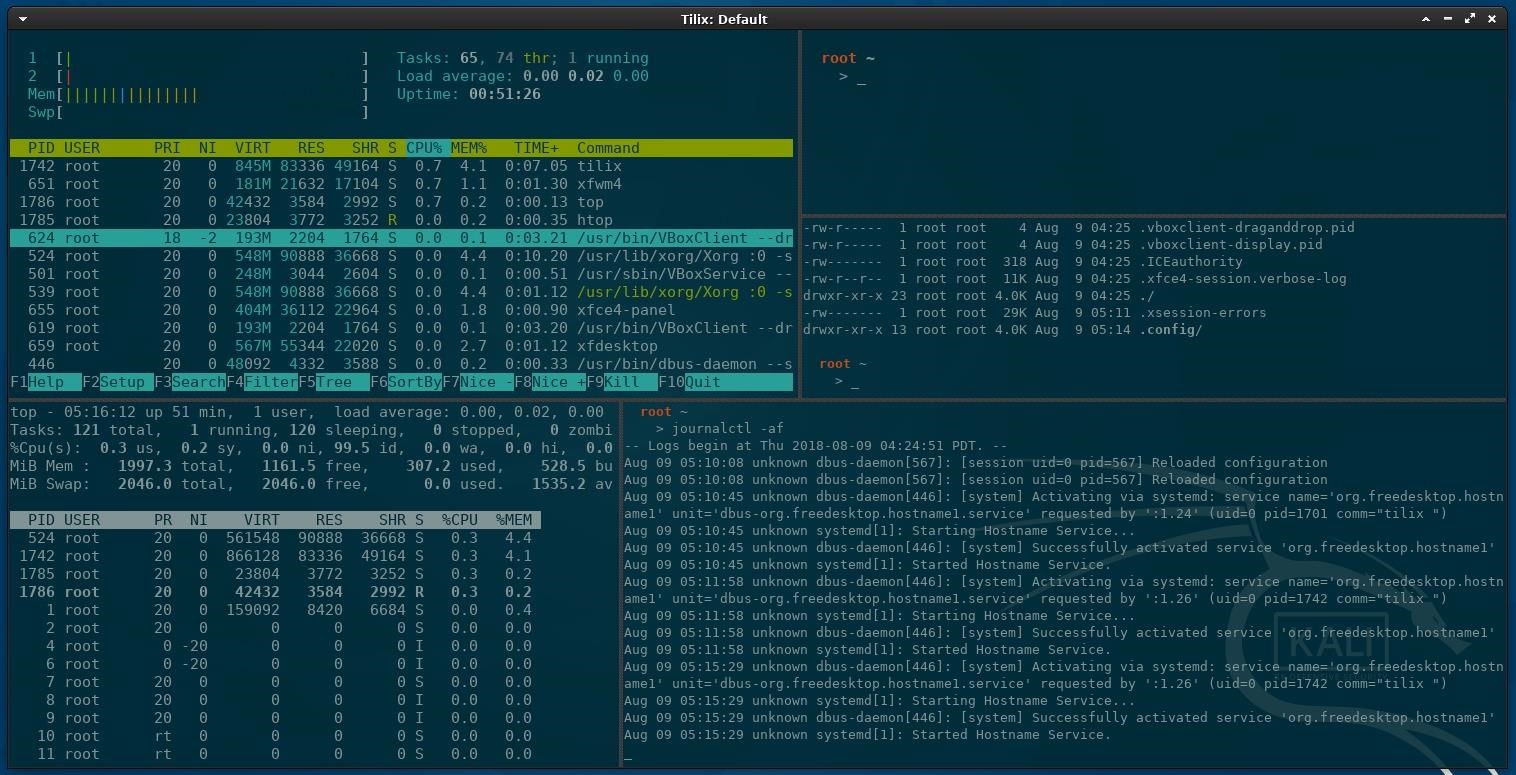
A multiplexer is a tiling terminal emulator that allows us to open several terminal sessions inside one single window. The major benefit to this is being able to see all of our open terminal sessions at once and not layer the windows on top of each other. Below is a multiplexer example.
There are many noteworthy multiplexers. Tilix, as seen in the above screenshot, is an open-source and reliable option. Alternatives include tmux and screen.
Tilix is available in Kali's APT repositories and can be installed using the below command.
apt-get install tilix

Reading package lists... Done
Building dependency tree
Reading state information... Done
The following additional packages will be installed:
  libgtkd-3-0 libphobos2-ldc-shared78 libvted-3-0 tilix-common
Suggested packages:
  python-nautilus
The following NEW packages will be installed:
  libgtkd-3-0 libphobos2-ldc-shared78 libvted-3-0 tilix tilix-common
0 upgraded, 5 newly installed, 0 to remove and 466 not upgraded.
Need to get 10.7 MB of archives.
After this operation, 49.1 MB of additional disk space will be used.
Do you want to continue? [Y/n] y
5Install Your Favorite Hacking Tools
Some versions of Kali are geared toward minimalist pentester's who prefer not to have hundreds of hacking tools preinstalled. This means we'll have to install our favorite tools manually. The types of tools we use vary based on our skill set and areas of expertise, but below are some popular hackings tools.
Wireshark: Graphical application for network traffic analysis.
These tools can be installed using the below command.
apt-get install maltego metasploit-framework burpsuite wireshark aircrack-ng hydra nmap beef-xss nikto

Reading package lists... Done
Building dependency tree
Reading state information... Done
hydra is already the newest version (8.6-1kali1).

The following NEW packages will be installed:
  beef-xss binfmt-support burpsuite fastjar fonts-droid-fallback fonts-lato
  fonts-noto-mono ghostscript gsfonts imagemagick imagemagick-6-common
  imagemagick-6.q16 jarwrapper java-wrappers javascript-common libc-ares2
  libcupsfilters1 libcupsimage2 libdjvulibre-text libdjvulibre21 libdouble-conversion1
  libfftw3-double3 libgmp-dev libgmpxx4ldbl libgs9 libgs9-common libhttp-parser2.8
  libijs-0.35 libilmbase23 libjbig2dec0 libjs-jquery libjs-jquery-easing
  libjs-jquery-fancybox libjs-jquery-mousewheel libjs-jquery-ui libjs-source-map
  libjs-uglify libjxr-tools libjxr0 liblqr-1-0 liblua5.2-0 libmagickcore-6.q16-6
  libmagickcore-6.q16-6-extra libmagickwand-6.q16-6 libnetpbm10 libnl-route-3-200
  libopenexr23 libpaper-utils libpaper1 libpcre2-16-0 libqt5core5a libqt5dbus5
  libqt5gui5 libqt5multimedia5 libqt5multimedia5-plugins libqt5multimediagsttools5
  libqt5multimediawidgets5 libqt5network5 libqt5opengl5 libqt5printsupport5 libqt5svg5
  libqt5widgets5 libruby2.5 libsbc1 libsmi2ldbl libspandsp2 libssh-gcrypt-4 libuv1
  libwhisker2-perl libwireshark-data libwireshark11 libwiretap8 libwmf0.2-7
  libwscodecs2 libwsutil9 libxcb-icccm4 libxcb-image0 libxcb-keysyms1 libxcb-randr0
  libxcb-render-util0 libxcb-xinerama0 libxcb-xkb1 libxkbcommon-x11-0 libyaml-0-2
  maltego netpbm nikto nodejs nodejs-doc openjdk-8-jre openjdk-8-jre-headless
  qt5-gtk-platformtheme qttranslations5-l10n rake ruby ruby-addressable ruby-ansi
  ruby-atomic ruby-buftok ruby-celluloid ruby-celluloid-io ruby-daemons
  ruby-dataobjects ruby-dataobjects-mysql ruby-dataobjects-postgres
  ruby-dataobjects-sqlite3 ruby-dev ruby-did-you-mean ruby-diff-lcs ruby-dm-core
  ruby-dm-do-adapter ruby-dm-migrations ruby-dm-serializer ruby-dm-sqlite-adapter
  ruby-docile ruby-domain-name ruby-em-websocket ruby-equalizer ruby-erubis
  ruby-eventmachine ruby-execjs ruby-faraday ruby-geoip ruby-hitimes ruby-http
  ruby-http-cookie ruby-http-form-data ruby-http-parser.rb ruby-json ruby-librex
  ruby-libv8 ruby-memoizable ruby-mime-types ruby-mime-types-data ruby-minitest
  ruby-mojo-magick ruby-msfrpc-client ruby-msgpack ruby-multi-json ruby-multipart-post
  ruby-naught ruby-net-telnet ruby-nio4r ruby-oj ruby-parseconfig ruby-power-assert
  ruby-public-suffix ruby-qr4r ruby-rack ruby-rack-protection ruby-ref ruby-rqrcode
  ruby-rspec-expectations ruby-rspec-support ruby-rubydns ruby-simple-oauth
  ruby-simplecov ruby-simplecov-html ruby-sinatra ruby-sqlite3 ruby-term-ansicolor
  ruby-test-unit ruby-therubyracer ruby-thread-safe ruby-tilt ruby-timers ruby-tins
  ruby-twitter ruby-uglifier ruby-unf ruby-unf-ext ruby-xmlrpc ruby-zip ruby2.5
  ruby2.5-dev ruby2.5-doc rubygems-integration thin wireshark wireshark-common
  wireshark-qt zip
The following packages will be upgraded:
  aircrack-ng libcups2 libnl-3-200 libnl-genl-3-200 libxkbcommon0 metasploit-framework
  nmap nmap-common
8 upgraded, 182 newly installed, 0 to remove and 458 not upgraded.
Need to get 381 MB of archives.
After this operation, 616 MB of additional disk space will be used.
Do you want to continue? [Y/n] y
6Install the Latest Version of Tor
Tor is available in Kali's repositories, but anonymity software should be acquired directly from the source (torproject.org). Furthermore, Kali's version of Tor is not reliably maintained or updated. This means we could be missing critical stability and security updates.
Add the Tor Project repositories to your APT repository list.
Install Tor using the below command, and you're done.
apt-get install tor deb.torproject.org-keyring

Reading package lists... Done
Building dependency tree
Reading state information... Done
Suggested packages:
  mixmaster torbrowser-launcher socat tor-arm apparmor-utils obfs4proxy
The following NEW packages will be installed:
  deb.torproject.org-keyring
The following packages will be upgraded:
  tor
7Configure File Sharing with Syncthing
Syncthing, created by Jakob Borg, is a cross-platform, private, lightweight file-syncing (Dropbox) alternative. As a penetration tester, transferring keystroke logs, screenshots, webcam recordings, and sensitive loot files between virtual private servers and local Kali machines can be a frustrating task. Syncthing makes secure file-sharing totally painless.
I've covered the Syncthing installation and configuration in a previous article. Readers should reference that for a detailed step-by-step guide.
8Install a Code Editor
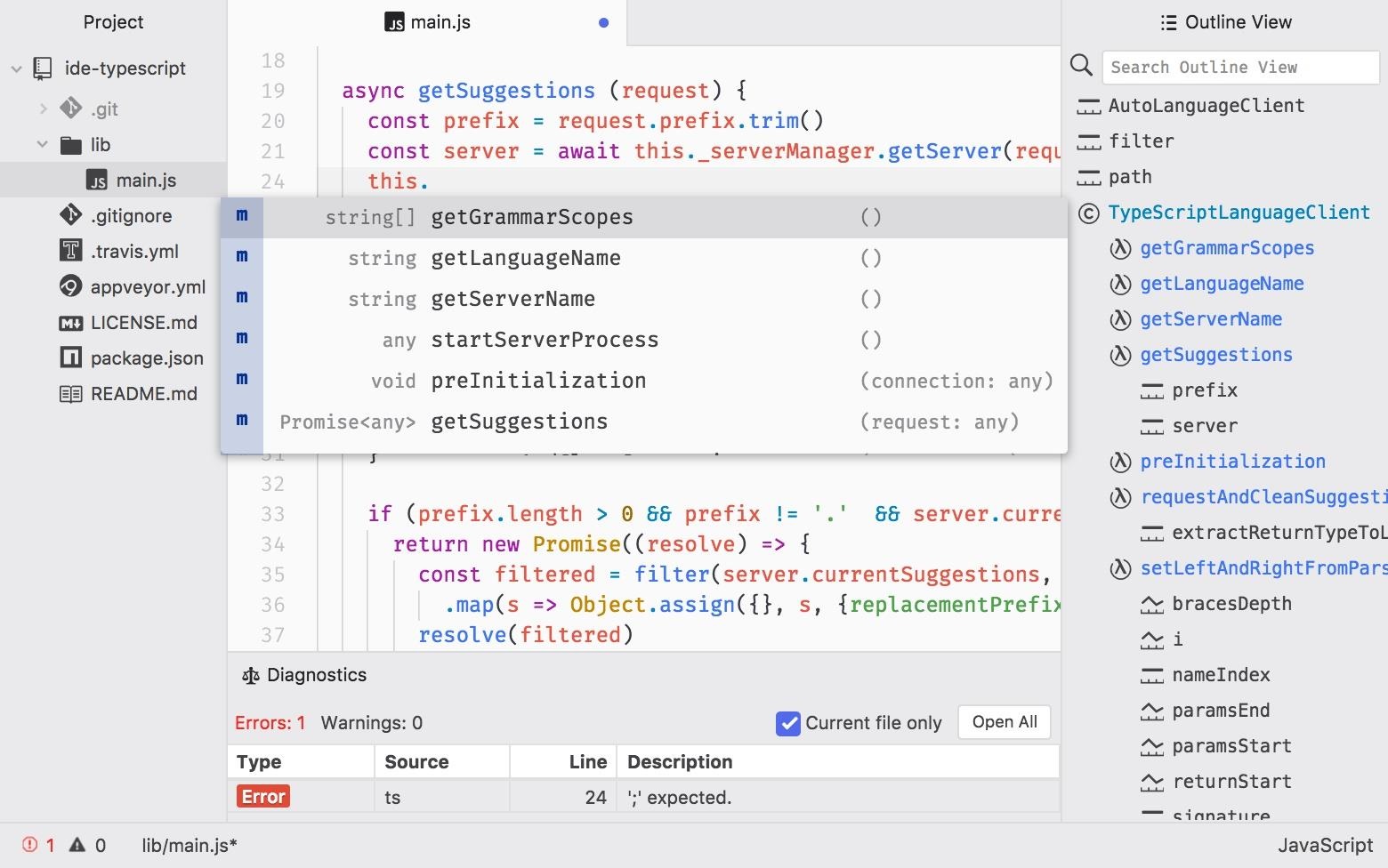
Atom is a free, open-source, feature-rich, and highly customizable text editor. Its features include the ability to collaboratively share code in real time, intuitive coding autocompletion, and the ability to install packages which further enhance Atom's versatility. Other noteworthy text editors include Geany and Gedit.
To install Atom, head over to their website and download the latest Debian installer. Next, open a terminal and install the required dependencies using the below apt-get command.
apt-get install gvfs gvfs-common gvfs-daemons gvfs-libs gconf-service gconf2 gconf2-common gvfs-bin psmisc

Reading package lists... Done
Building dependency tree
Reading state information... Done
Correcting dependencies... Done
The following NEW packages will be installed:
   gconf-service (3.2.6-4.1)
   gconf2 (3.2.6-4.1)
   gconf2-common (3.2.6-4.1)
   gvfs-bin (1.36.2-1)
   libgconf-2-4 (3.2.6-4.1)
   psmisc (23.1-1+b1)
The following packages will be upgraded:
   gvfs (1.36.1-1 => 1.36.2-1)
   gvfs-common (1.36.1-1 => 1.36.2-1)
   gvfs-daemons (1.36.1-1 => 1.36.2-1)
   gvfs-libs (1.36.1-1 => 1.36.2-1)
4 upgraded, 6 newly installed, 0 to remove and 462 not upgraded.
1 not fully installed or removed.
Need to get 3,317 kB of archives.
After this operation, 8,909 kB of additional disk space will be used.
Do you want to continue? [Y/n] y
Finally, use dpkg, a command line package manager, with the install (-i) argument.
dpkg -i ~/Downloads/atom-amd64.deb

(Reading database ... 191882 files and directories currently installed.)
Preparing to unpack atom-amd64.deb ...
Unpacking atom (1.29.0) over (1.29.0) ...
Setting up atom (1.29.0) ...
Processing triggers for desktop-file-utils (0.23-3) ...
Processing triggers for mime-support (3.60) ...
When that's done, Atom will be available in your Applications menu.
The USB Rubber Ducky is the notorious keystroke injection tool. Creating ducky payloads is easy using the DuckToolKit website, but as a penetration tester, it's unsafe to share client information with random websites. Uploading payload contents to a third-party website can be dangerous.
Instead, we can use Git to clone the USB Rubber Ducky repository and encode payloads locally.
Then, change (cd) into the USB-Rubber-Ducky/Encoder/ directory and use the following java command to start encoding ducky payloads without third-party websites.
cd USB-Rubber-Ducky/Encoder/
java -jar encoder.jar -i input_payload.txt -o inject.bin
10Change SSH Keys & Default Password
The default password for every Kali Linux installation is the same (toor) which makes it very easy to automate attacks. Also, the default SSH keys can allow an attacker to intercept your communications when you're controlling something like a Raspberry Pi via SSH.
To change the SSH keys, first, change into the directory. Doing the below two commands will reset the SSH keys from the default ones.
cd /etc/ssh/
dpkg-reconfigure openssh-server

rescue-ssh.target is a disabled or a static unit, not starting it.
Now, for your Kali system's password, enter passwd root, then enter in your new password. Afterward, retype it to confirm. If you're not logged in as root, you may be asked for your current password before doing this.
passwd root

Enter new UNIX password:
Retype new UNIX password:
passwd: password updated successfully
What's the First Thing You Do After Installing Kali?
Did I miss any critical steps? How do you personalize and customize new Kali installations? Be sure to leave a comment below.
Torrent From the Cloud With Seedr W hat is Seedr.cc ? Seedr is a torrent leeching online engine and a seedbox that helps to download torrent files directly via browser instead of using any of the p2p network clients such as Utorrent, Bit-torrent . The problem facing in downloading a torrent might be the absence of seeds and the torrent’s age. If you want to download torrents that are three or more years old, probably the seeders of the Torrents are less in number or may be zero, which makes the torrent un-downloadable. Homepage of Seedr Seeding determines how strong the torrent is and how easy to download the torrent. Or in other words, seeding determines the life of a torrent. Seeders are broadcast contributors of the file, while leechers/leech shows the number of receivers or downloaders attached to a torrent. It requires a torrent client to access and download torrent files, and also, the number of seed is essential. Here where Seedr comes to play its role. Seedr h...
If your Microsoft Windows Store becomes corrupted, or uninstalled, there are a few ways you can reinstall it. Some options are more technical than others. Option 1 REINSTALL WINDOWS STORE VIA POWERSHELL Open an elevated Powershell window (run as administrator) Run this command to try to reinstall the Microsoft Store: Get-AppxPackage -allusers Microsoft.WindowsStore | Foreach {Add-AppxPackage -DisableDevelopmentMode -Register "$($_.InstallLocation)\AppXManifest.xml"} Sometimes this method will give you the following errors. If this is the case, try another method. Add-AppxPackage : Deployment failed with HRESULT: 0x80073CF6, Package could not be registered. error 0x80070057: While processing the request, the system failed to register the windows.applyDataExtension extension … error 0x80070057: Cannot register the request because the following error was encountered during the registration of the windows.applyDataExtension extension: The parameter is incorrect. An internal err...
PowerShell is an essential component of any Windows environment and can be a powerful tool in the hands of a hacker. During post-exploitation, PowerShell scripts can make privilege escalation and pivoting a breeze, but its execution policy can put a damper on even the best-laid plans. There are a variety of methods, however, that can be used to bypass PowerShell execution policy. PowerShell Execution Policy Overview The purpose of PowerShell's execution policy is to control how configuration files are loaded and how scripts are run. It's a safety feature that helps prevent malicious scripts from being executed. Policies can be set at the computer level, user level, and session level on Windows machines. It's important to note that the execution policy is not meant to be secure — it merely prevents users from unintentionally causing damage. As we'll soon find out, it can be bypassed in several ways. There are seven types of execution policies in PowerShell. ...
Tor Browser is a famous browser if you want your privacy over the internet. No one can trace your daily use like what are you doing, what website you visit etc. Kali Linux provides tons of tools which is help us in our security research project but in Kali Linux Tor Browser is not pre-installed we have to install Tor Browser in Kali Linux after installing the Kali Linux. You can read more at Tor Project . HOW TO INSTALL TOR BROWSER IN KALI LINUX USING APT Step 1 Open a terminal window Step 2 Run apt-get update Step 3 Run apt-get install tor torbrowser-launcher and select Y at the prompt Now you’ll have a new Tor Browser application in the Applications menu under Usual Applications and Internet. This shortcut will only work if you’re not running as the root user. See the instructions below if you’re running Kali as root. HOW TO INSTALL TOR BROWSER IN KALI LINUX MANUALLY Download the Tor Bundle from here: Tor Bundle Download Download a packa...
Easily migrate an existing Windows installation to a Solid-State Drive This article shows the best way to move Windows 10, 8.1, and 7 from an existing drive to a new SSD, as well as addressing any problems that may occur after the fact. The screenshots below are from Windows 10, but the instructions also apply to Windows 7 and 8.1. Prepare Your Source Drive Before you clone Windows 10 to SSD (or Windows 7 or 8.1) you need to make sure that both the source drive, the one you're cloning from, and its destination SSD are ready. With the source hard drive, you want to remove any unnecessary data that you don't want to bring with you as you clone it. That not only saves space on the new drive, but can speed up the cloning process. There are a number of great tools to use for cleaning a drive. Windows own Disk Cleanup is a great place to start, though you may also want to consider the Free Up Space tool for more advanced disk space cleaning. As important as it is to get your so...
Run Android apps on your desktop with Phoenix OS and other options It's possible to install Android on a PC without using an emulator . Learn how to run Android apps and access a full version of the mobile operating system on Windows. Note: Instructions in this article apply to desktops and laptops running Windows 10, 8, and 7 . Why Install Android on PC? If you don't have an Android device, you're missing out on millions of apps in the Google Play Store. Even if you already have a smartphone or tablet that you play Android games on, you might prefer to play them on your PC. There are several ways to run Android apps on your computer. For example, the Android SDK comes with an Android emulator for debugging apps, and BlueStacks is a cloud-based virtual machine that optimizes Android apps for desktops. However, if you want to access the full version of Android without an emulator, then your best bet is Phoenix OS. What Is Phoenix OS?...



Comments
Post a Comment